
Top Tools for Monitoring Online Activity
Online safety tools are essential for protecting kids from digital dangers like cyberbullying, self-harm, and harmful content. Modern tools offer features like AI alerts, content filters, and activity logs to help parents stay informed without invading privacy. Here's a quick look at what to consider:
- Key Features: Look for AI-powered alerts, content filtering, and detailed usage reports.
- Age-Specific Options: Stricter controls for younger kids; collaborative monitoring for teens.
- Top Picks: Qustodio for detailed tracking, Bark for privacy-first AI alerts, and Google Family Link for free basic controls.
- Specialized Tools: Guardii for Instagram moderates toxic comments and DMs, while gaming platforms offer parental controls for social interactions.
Pro Tip: Pair these tools with open conversations about online safety to build trust and encourage responsible behavior.
Best Parental Control Apps | Top 4 for 2026: Bark vs Qustodio vs Aua vs Family Keeper
What to Look for in Monitoring Tools
When selecting monitoring tools, it’s crucial to strike a balance between effective oversight and respecting your child’s privacy. The goal isn’t to micromanage every text or search but to focus on features that genuinely protect them from harm. The best tools are those that alert you to real dangers without granting you unrestricted access to their digital life. Tailor the tool’s capabilities to your child’s age: stricter filters and limits for younger kids (ages 6–9), activity reports for preteens (ages 10–12), and collaborative monitoring for teenagers (ages 13–15).
If you’re using built-in options like Apple Screen Time, Google Family Link, or Microsoft Family Safety, they can be a good starting point. However, families with a mix of devices - like iOS, Android, Windows, and Kindle - might benefit from third-party solutions that work seamlessly across all platforms.
You’ll also need to decide between device-level monitoring (tracking activity on specific devices, including cellular data) and network-level controls (covering all devices connected to your Wi-Fi, but excluding mobile data). Take advantage of free trials to ensure the software supports the apps your child uses. Here are some key features to prioritize in a monitoring tool.
Activity Logs and Usage Reports
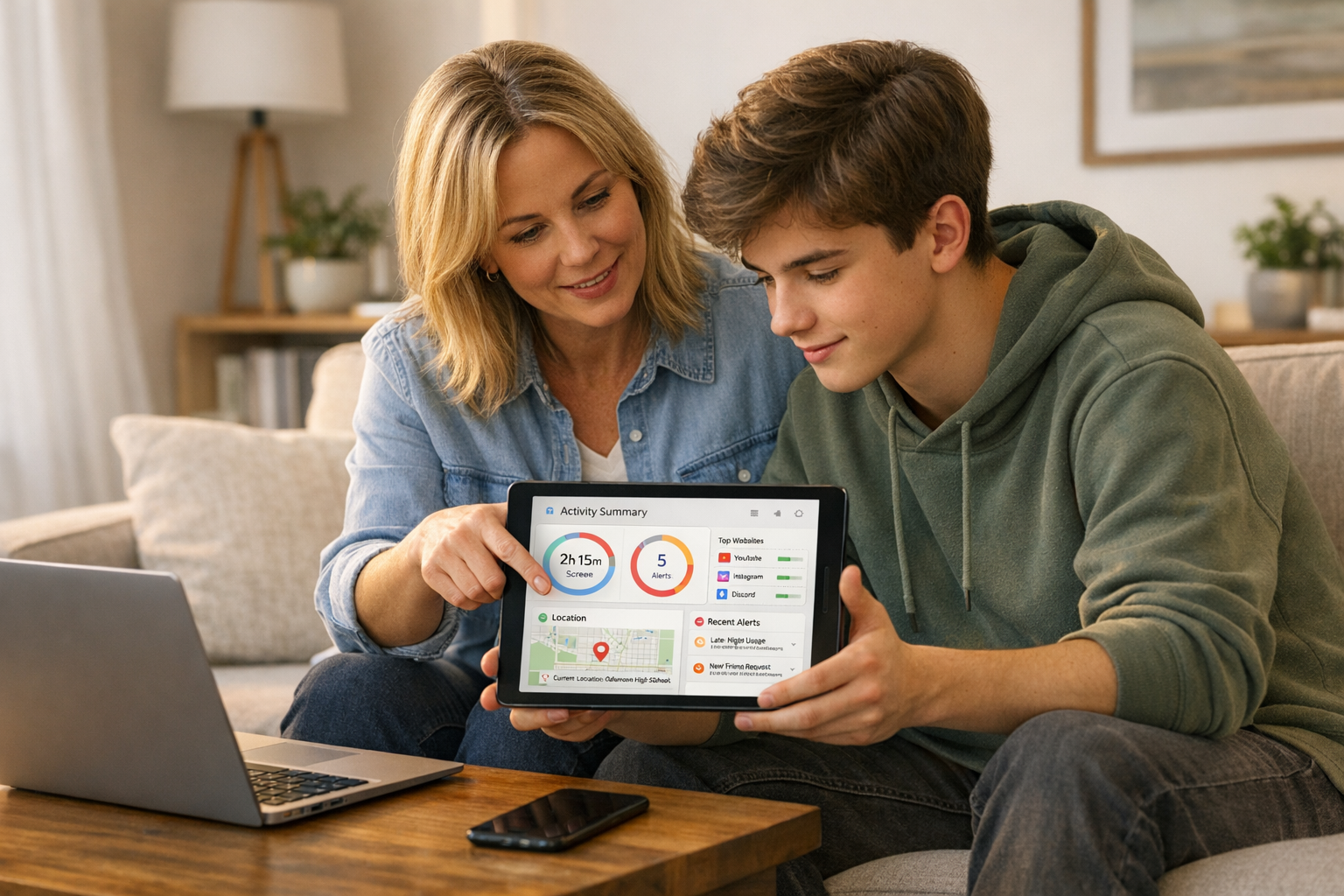
Detailed activity logs are a must-have. These logs provide a timeline of your child’s online behavior, showing websites visited, time spent on various apps, and overall screen time. Many tools offer user-friendly dashboards that categorize activity into groups like social media, gaming, or educational apps. This makes it easier to notice patterns, such as excessive late-night usage or sudden interest in unfamiliar platforms.
Content Filters and Safe Search
Another critical feature is content filtering. These filters block inappropriate material such as pornography, gambling sites, and violent content. For younger kids, enabling SafeSearch on search engines like Google or Bing can help keep explicit material out of their results.
The best filtering tools allow for customization. For example, you can block adult content entirely while still permitting access to educational or news websites. You can also block specific apps or websites for more precise control. Content filters are especially useful for younger children. As they grow and become more tech-savvy, you can gradually ease restrictions and focus on fostering open discussions about online safety.
AI Alerts for Dangerous Interactions
AI-powered monitoring takes things a step further by analyzing context, not just keywords. These tools use natural language processing to differentiate between casual remarks and serious concerns, such as distinguishing a frustrated comment about homework from a genuine cry for help.
Modern AI tools can monitor texts, emails, and over 30 social media platforms simultaneously to detect threats like cyberbullying, grooming, self-harm, and explicit content. Instead of requiring you to sift through every message, these systems notify you only when they detect something alarming, helping maintain your child’s privacy while ensuring their safety. To date, AI monitoring has identified 4.6 million severe self-harm cases and 7.6 million severe bullying incidents across millions of children [4][2]. These systems even adapt to teen-specific language, recognizing slang, emojis, and scanning images or videos for inappropriate content.
Look for tools that allow you to adjust alert sensitivity based on your child’s maturity. For instance, you might choose to ignore casual profanity but flag mentions of drugs or weapons. Ideally, the tool should also provide expert advice when an alert is triggered, guiding you through difficult conversations rather than leaving you to figure it out on your own.
General Monitoring Tools
Across the United States, parental control platforms are stepping up to provide real-time insights into children's online behavior while keeping an eye out for potential dangers like predatory contact. These tools take different approaches - some focus on detailed activity logs, while others use AI-driven alerts that aim to respect privacy. In 2023, 73% of parents reported using a monitoring app to oversee their kids' internet activity, highlighting growing concerns about online safety [7]. Here’s a look at some of the top tools that strike a balance between oversight and privacy.
Qustodio
Qustodio is a standout option for parents looking for detailed activity tracking with flexible controls. Its dashboard provides a clear picture of browsing history, app usage, screen time, and even call and SMS details, helping to spot issues like cyberbullying or predatory behavior. Instead of blanket bans, parents can set tailored time limits for specific apps or websites, which helps maintain trust while ensuring safety.
Qustodio is available as a free version for one device, with premium plans starting at $54.95/year for basic features or $99.95/year for full monitoring [6][3]. A tester from SafeWise shared their experience:
"Qustodio was easy to set up and install for the most part, but there's kind of a weird process for setting up uninstall protection" [6].
To prevent tampering, the tool requires a separate desktop application. Its cloud-based dashboard and AI alerts have earned it a 4.75/5 rating from SafeWise [6].
Bark
Bark takes a privacy-first approach, using AI to scan texts, emails, and over 30 social media platforms for over 29 categories of concerning content, such as grooming, self-harm, violence, and predatory behavior [6]. Instead of showing every message, Bark sends alerts only when it identifies potentially dangerous activity, allowing parents to address issues without invading everyday conversations.
Its features include sexting prevention and adaptive AI that understands teen slang. Subscriptions start at $5.00/month for basic features, with Bark Premium available for about $14/month, covering unlimited devices [6][3]. Bark has earned a 4.8/5 rating for its wide-ranging monitoring capabilities [6].
Google Family Link
For families looking for a free, straightforward option, Google Family Link offers basic device-level controls. It allows parents to approve or block apps before they’re downloaded, set daily screen time limits, and track device locations - all at no cost [6][7]. Integrated with Android, it provides basic usage stats and is ideal for parents who need foundational oversight.
However, Family Link doesn’t monitor social media, email, or messaging content [6]. PCMag has praised it as a top choice among native OS apps for non-invasive child monitoring [3]. Experts suggest it works best when paired with conversations about digital boundaries, making it particularly effective for younger kids. Families with teenagers, however, may find they need more advanced tools as their children grow [7].
sbb-itb-47c24b3
Social Media and Messaging Protection Tools
Specialized tools are designed to address the unique risks that come with social media and messaging platforms. With U.S. teens spending an average of over four hours daily on social platforms and 17% reporting unsettling contacts [8][10], these areas demand particular attention. Standard parental controls often fall short when it comes to monitoring direct messages and comment sections, where many issues arise.
Guardii for Instagram Protection
Guardii stands out by using AI to moderate Instagram comments and direct messages (DMs) in more than 40 languages. It automatically hides toxic comments in line with Meta's policies, while giving parents the ability to unhide, delete, or report flagged content with a single click. Beyond comments, it detects threats and sexualized harassment in DMs - types of predatory behavior that general tools often overlook.
Flagged interactions are organized into Priority and Quarantine queues, with real-time alerts sent through Slack, Teams, or email. For serious cases, evidence packs - including timestamps and audit logs - are provided. The tool also maintains watchlists for repeat offenders, helping to identify and address harassment patterns before they escalate.
Gaming Platform Controls
Gaming consoles have evolved into social spaces where kids interact with both friends and strangers, making robust safety features essential. Platforms like PlayStation, Xbox, and Nintendo Switch now offer tools for parents to set playtime limits, approve friend requests, and control spending to prevent unauthorized purchases. These features are especially effective in blocking grooming tactics often seen in in-game chat functions.
Parents can adjust settings remotely through dedicated apps, making it easier to manage controls on the go. Features like restricting communication to "Friends Only" or "No One" help limit unwanted interactions with strangers [9]. When selecting a tool, prioritize tamper-proof settings to prevent kids from disabling monitoring features or deleting the app [4]. Most major platforms also offer age-rating restrictions for games, and younger children can have chat functions entirely disabled if social features aren't necessary.
These specialized tools work alongside general monitoring methods, offering unique features that can be compared in a comprehensive selection checklist.
How to Compare and Choose the Right Tool
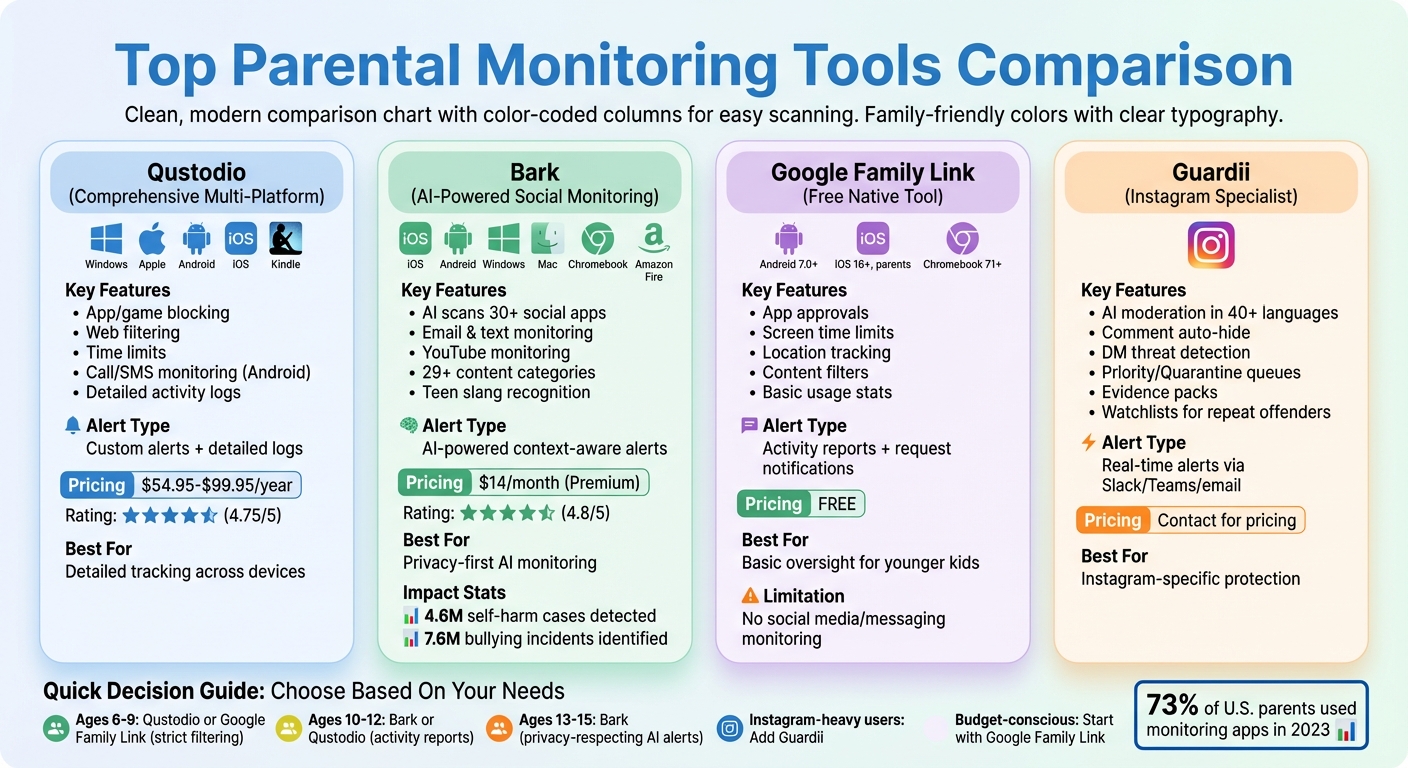
Comparison of Top Parental Monitoring Tools: Features, Platforms, and Pricing
Feature Comparison Table
Here’s a quick breakdown of four monitoring tools, covering platform compatibility, features, alert systems, and pricing:
| Monitoring Solution | Platform Coverage | Features & Monitoring Depth | Alert Mechanisms | Pricing |
|---|---|---|---|---|
| Comprehensive Multi-Platform Tool | Windows, macOS, Android, iOS, Kindle | App/game blocking, web filtering, time limits, and call/SMS monitoring (Android) | Custom alerts and detailed activity logs | $54.95 – $99.95/year |
| AI-Powered Social Monitoring Tool | iOS, Android, Windows, Mac, Chromebook, Amazon Fire | AI-scanned texts across 30+ social apps, email, search, and YouTube | AI-powered alerts across numerous categories | $14/month (Premium) |
| Native Free Family Monitoring Tool | Android (7.0+), iOS (16+ for parents), Chromebook (71+) | App approvals, screen time controls, location tracking, and content filters | Activity reports and request notifications | Free |
| Guardii for Instagram Protection | Instagram only | AI moderation of comments and DMs in 40+ languages with auto-hide for toxic content | Real-time alerts via integrations; evidence packs when needed | Contact for pricing |
An AI-powered social monitoring tool stands out for its ability to analyze content deeply across platforms, scanning messages and posts for warning signs. For instance, one such tool has identified 4.6 million severe self-harm incidents and 7.6 million cases of severe bullying among 7.3 million children [4]. On the other hand, a native family monitoring tool offers basic features like app approvals and screen time limits at no cost, making it a great choice for budget-conscious families. A comprehensive multi-platform tool provides more advanced options, such as detailed activity logs and web filtering, though it comes at a higher price. Meanwhile, Guardii focuses solely on Instagram, helping to manage risks on a platform where teens often spend a lot of time, especially in direct messages.
Selection Checklist
Use the table above along with this checklist to help you pick the best solution for your family’s needs:
- Device Compatibility: Start by listing all the devices in your household and ensure they meet the minimum operating system requirements. For example, one native app requires Android 7.0+ for children and iOS 16+ for parents [11].
- Primary Apps: Identify the apps your child uses most. If Instagram is a key platform, consider adding Guardii for specialized monitoring. For younger kids (ages 6–9), prioritize tools with strict content filtering and screen time controls. For teens (ages 13–15), look for AI-driven alerts that balance privacy with safety [5].
- Ease of Use: Think about your comfort level with tech. Some Android features might require "sideloading" apps, which involves installing them outside of official app stores [3]. If that feels too complex, stick with tools that offer straightforward installation.
"Parents cannot set-and-forget these controls assuming that the devices and their children are protected."
– Dr. Adam Pletter, Child and Adolescent Psychologist, iParent 101 [12]
As your child grows, revisit the monitoring solution to ensure it continues to align with your family’s changing needs. Regular adjustments will help maintain the right balance of safety and independence.
Conclusion
Monitoring tools can play a key role in keeping your child safe online, but their effectiveness increases significantly when paired with open and honest conversations about digital safety. The goal isn’t to spy but to encourage self-awareness and responsible behavior. As ConnectSafely aptly puts it, "The only filter that can fully protect your child for life isn't the one that runs on a computer or a phone but the one that runs in the software between their ears" [1].
At the heart of digital safety is trust. Be transparent about using these tools; secret monitoring can erode the trust you’ve built. Kimberly S., a parent who uses monitoring software, explains it well: "My approach is not 'gotcha' but 'I love you and this helps me support you.' My children understand I trust them but I need to be alerted to some things" [4]. This mindset fosters understanding and collaboration rather than conflict.
As your child grows, adjust your approach - strict settings might work for younger kids, but teens benefit more from shared decision-making and gradual independence. No tool is perfect, and kids are often clever enough to find workarounds. That’s why ongoing conversations are crucial. Use activity reports and alerts as opportunities to talk, not as traps to catch them off guard.
Finally, lead by example. Show the same digital habits you want your child to develop, like managing screen time and respecting online boundaries. These behaviors, combined with thoughtful use of monitoring tools, create a foundation for long-term digital safety and well-being. Together, these strategies help build a safer, more supportive online experience for your child.
FAQs
How do AI-powered alerts protect my child's safety while respecting their privacy?
AI-powered alerts are designed to help keep your child safe by analyzing their online activity in a privacy-conscious way. These systems monitor for risks like bullying, threats, or inappropriate language within secure, encrypted environments. They don’t store raw content unless a genuine danger is identified. Instead of providing full conversations, they send concise alerts, such as: “Potential harmful language detected in a private message.” This allows parents to take quick action without intruding on their child’s privacy.
To protect sensitive information, these alerts use methods like anonymization and retain only minimal metadata. If a significant risk is detected, the system securely logs evidence for review by safety teams, ensuring unnecessary details are not exposed. This thoughtful approach strikes a balance between respecting privacy and offering actionable insights, equipping you to protect your child while maintaining their trust.
What should I consider when choosing between device-based and network-based monitoring tools for my child’s online activity?
When choosing between device-based and network-based monitoring tools, it’s essential to consider your family’s online habits and what level of oversight you need.
Device-based tools are installed directly on your child’s smartphone, tablet, or computer. These tools provide detailed insights, such as screen time, app usage, and even location tracking. They’re especially useful for monitoring activity on cellular data or offline apps. However, they do require installation on each individual device, and tech-savvy kids might find ways to disable them.
On the other hand, network-based tools operate at the router level, overseeing all devices connected to your home Wi-Fi. They’re ideal for larger households since they can block inappropriate websites across all connected gadgets. That said, they don’t monitor activity on cellular data or VPNs and don’t provide detailed reports on specific app usage.
When deciding, think about factors like the level of coverage you need, how easy the tools are to set up, and any privacy concerns. Device-based tools are great for more detailed, hands-on control, while network-based solutions offer broader, household-wide protection. The best choice depends on your child’s age, their online behavior, and your family’s privacy priorities.
How can I adjust monitoring tools as my child grows and their online habits evolve?
As your child grows older, it’s crucial to tweak monitoring settings to strike a balance between their increasing independence and staying safe online. Here are a few ways to make those adjustments:
- Update content filters: Transition from strict child-focused filters to settings that allow access to age-appropriate educational resources, videos, and social platforms.
- Adjust screen time and app limits: Gradually increase daily limits for apps that support learning or creativity, while keeping restrictions on entertainment or high-risk apps.
- Refine alerts and permissions: Enable keyword alerts for serious issues like bullying or inappropriate content, and expand communication monitoring to include a wider circle of contacts.
Make it a habit to review activity reports and have open discussions about online habits with your child. This approach helps ensure their digital environment grows with them while staying safe and supportive.